The AI note taker for Google Meet that needs no Gemini plan
Meet's 'Take notes for me' only works when the organiser's Workspace edition includes it, and the notes are written on Google's servers. Private Notetaker takes notes on your own computer in any Meet call, including the ones you join from a free Gmail account.
macOS (Apple Silicon) & Windows (64-bit) · Free 7-day trial · No card required.
| Private Notetaker | Gemini in Meet (Take notes for me) | Bot notetakers (Otter, Fireflies, Fathom) | |
|---|---|---|---|
| Where the meeting is processed | 100% on your device | On Google's servers | On the vendor's servers |
| Bot in the participant list | Nothing. It runs on your computer, not in the meeting | No, built into Meet; everyone is told notes are being taken | Yes, a bot participant joins |
| Needs a paid plan | No Google Meet plan needed. Works for meetings you host and ones you join | The organiser needs a Workspace edition or Google AI plan that includes it; transcripts need Business Standard or above | Free tiers with monthly caps; paid seats for full use |
| Works offline | Yes, fully | No | No |
| Where your notes live | Only on your own disk | The organiser's Google Drive, in the Google Meet folder | The vendor's cloud |
| Who can use it | Anyone on the call, from their own computer | Only meetings organised on an eligible plan | Anyone with a vendor account, host or not |
| Price | $15/mo or $149 once, yours forever | See each vendor's pricing page | |
Platform and vendor facts as published on their own pages, checked 16 September 2026.
Their privacy is a policy.
Ours is architecture.
Privacy by policy
Every cloud note taker
- Hosted in a chosen region, so you trust where the servers are
- Encrypted in transit and at rest, so you trust the keys are handled well
- Deleted on request, so you trust the deletion actually happens
- “We don’t train on your data”, so you trust the pledge outlives the roadmap
Privacy by architecture
Private Notetaker
- ✓Audio is captured, transcribed, and summarized on your hardware
- ✓There is no server holding your meetings to breach or subpoena
- ✓Nothing to delete, because nothing was ever collected
- ✓No pledge required. The data simply is not there
Don't take our word for it. Turn WiFi off and watch it keep working.
How it works with Google Meet
Private Notetaker captures the audio of the Meet call from your browser as it plays, so it works when a client organises the meeting, on a personal Google account, and without a Workspace admin turning anything on.
Hit record
Open Private Notetaker before the call and press record. No bot joins, nothing appears in the participant list, and no Google Meet setting is involved.
Local AI transcribes
A Whisper-class model turns speech into text and a local language model writes the summary. All of it on your hardware, so it works offline and nothing is uploaded.
Notes, done
Summary, key decisions, action items, and the full transcript, ready the moment you stop recording. Searchable forever, stored only on your machine.
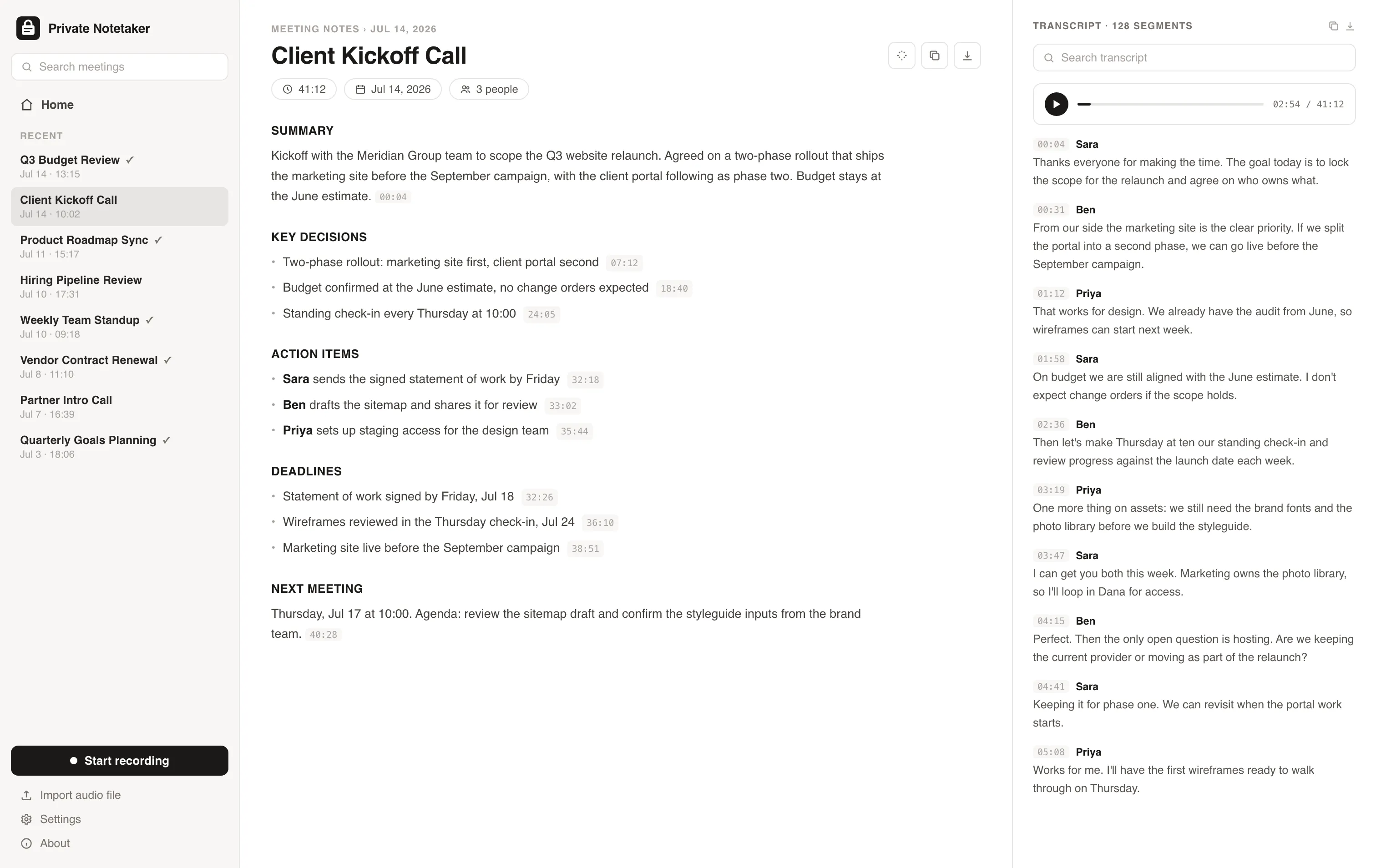
I built this for myself. I live in back-to-back client calls, and I was never comfortable piping confidential conversations about clients' revenue, ad accounts, and contracts through someone else's cloud just to get a summary. So I made a note taker where everything stays on my machine. I have used it every working day since. Now I am opening it up.
Simple pricing. Either way, it is all yours.
Available for Mac & Windows. Pay once or monthly, whichever suits you.
Monthly
Cancel anytime. The notes you took stay yours.
- ✓Unlimited meetings and recording time
- ✓Local transcription and AI summaries
- ✓Full-history search on your device
- ✓Light and dark mode, Mac + Windows
- ✓No account required to take notes
Lifetime
Pay once, yours forever. Includes updates.
- ✓Unlimited meetings and recording time
- ✓Local transcription and AI summaries
- ✓Full-history search on your device
- ✓Light and dark mode, Mac + Windows
- ✓No account required to take notes
- ✓Never a subscription
Prefer to try first? Download the app and use it free for 7 days, no card needed. Buying charges right away and is backed by a 30-day money-back guarantee.
Google Meet questions, answered
Does Google Meet have an AI note taker? +
Yes. 'Take notes for me', powered by Gemini, writes a summary into a Google Doc in the organiser's Drive. Google's help page says the meeting organiser must have a Workspace edition or Google AI plan that includes it, it supports one language per meeting, and every participant is told that notes are being taken. It is Google's feature, running on Google's servers.
Is there a free AI note taker for Google Meet? +
Not from Google: a free Gmail account cannot organise a meeting with Take notes for me or transcription, though you can attend one. Third-party bots have free tiers with monthly caps. Private Notetaker has a 7-day free trial and then costs money, but it works in every Meet call regardless of who organised it and keeps the notes on your machine.
Does Google Meet transcribe for free? +
No. Google lists transcription for Business Standard, Business Plus, Enterprise, certain Education editions, and Workspace Individual. Transcripts do not require recording, participants get an on-screen warning, and the file is saved to the organiser's Drive.
How do I activate the note taker in Google Meet? +
As an eligible organiser, open the Gemini controls in the meeting and choose Take notes for me; participants see the pencil icon while it runs. If you are not the organiser, or your edition lacks it, run a local app instead: open Private Notetaker, press record, and the notes are written on your device when the call ends.
Recording law is real: read which states need everyone's consent before you rely on any of this.
Further reading
Your meetings are nobody else's business.
Download the AI note taker that keeps everything on your device. Free for 7 days, no account, no card.
Mac & Windows.