Private Notetaker

Available for Windows & Mac.

Private, offline transcription.
100% on your device.

Record a meeting or import an audio file. You get a transcript, meeting minutes, and action items from software that runs on your own Windows PC or Mac. No upload. No bot in the call.

Windows 10 & 11 (64-bit) · Mac (Apple Silicon) · Free 7-day trial · No card, just your email.

0 bytes leave your device
Works with WiFi off
No bot in your meetings
Nothing to breach. Nothing to subpoena.

How it works

On-device transcription and notes, in three steps.

1

Hit record

No bot joins and nothing appears in the participant list. Works with Zoom, Google Meet, Teams, a phone on speaker, or a conversation across the table. You can also import existing recordings.

2

Local AI transcribes

A Whisper-class model turns speech into text and a local language model writes the summary. All of it on your hardware. Offline transcription is not a mode, it is how the app always works.

3

Notes, done

Summary, key decisions, action items, and the full word-for-word transcript, ready the moment you stop recording. Searchable forever, stored only on your machine.

The full transcript, word for word

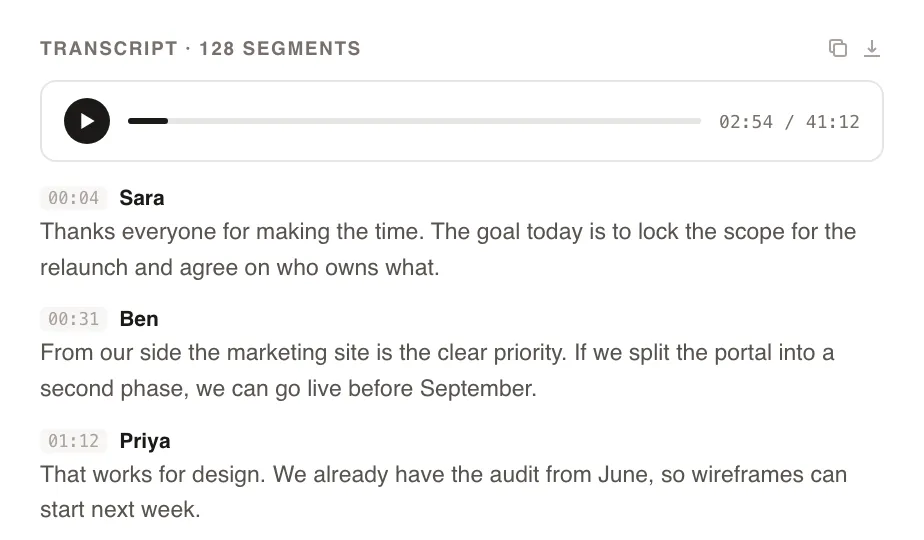
Every recording gets a complete, searchable transcript with an audio player attached. Search across everything you have ever transcribed and jump straight to the moment it was said. All of it indexed on your machine, none of it on anyone's server.

Searchable on-device transcript with built-in audio player

Meeting transcription, on the computer you already have

Meeting transcription software listens to a call and returns text. The usual products do that in the vendor's cloud. Otter, Fireflies, Fathom, and Read also put a bot in the meeting so the audio is easy for them to collect. That is a reasonable product if the archive is allowed to live with them.

Private Notetaker takes the audio from your machine. Zoom, Google Meet, Teams, a phone on speaker, or a file you drop in. The speech model runs locally, then a second local model writes the notes. English only. If you need other languages, a cloud tool is ahead of us, and you should buy one on purpose.

The wider comparison, including those cloud note takers and the local peers, is the best AI meeting note takers. The Mac-only local list is separate.

Meeting minutes are the short version

People ask for meeting minutes and get handed a transcript. Those are different documents. Minutes name the decision, who owns it, and what was left open. A transcript is the evidence underneath.

This app writes both from the same recording, on the device. You can search the words later. You can also send someone the summary without pasting twelve pages of dialogue. A transcription-only app stops before that second step. MacWhisper is excellent at the first step on a Mac, and the notes are your problem unless you connect a model. That split is why the MacWhisper alternatives page exists.

Audio you already recorded

Live meetings are not the only input. Import an audio file and the same pipeline runs: transcript, then notes, on the computer. Nothing about that requires a calendar connection or a bot that missed the original call.

Quality follows the recording. A laptop mic across a noisy table will miss names. A clean file from a recorder will not. The processing location does not fix a bad mic. It decides who else receives the file. For how local transcription behaves on a Mac, including how to test it, see local AI transcription on a Mac.

Free transcription software, and where the file goes

Free is real in this category, and it is usually the vendor's storage. Fathom's plan for individuals includes unlimited recordings and transcription, with the bot and the files on Fathom's servers. Otter's free plan is capped at 300 minutes a month, also in Otter's cloud. Fellow's free plan is 5 AI notes per user, for the life of the account. Jamie's docs list 10 meetings a month, 30 minutes each, transcribed in the EU. Krisp does not have a permanent free plan. The offer is a 7-day trial, then Core.

The local free route is MacWhisper's free version, on a Mac, for the transcript. Private Notetaker is free for 7 days, no card, then $15 a month or $149 once. After the trial you are paying so the models stay on your hardware. Compared with Otter, that trade is the side-by-side. A longer list is Otter alternatives.

Their privacy is a policy. Ours is architecture.

Privacy by policy

Every cloud note taker

  • Hosted in a chosen region, so you trust where the servers are
  • Encrypted in transit and at rest, so you trust the keys are handled well
  • Deleted on request, so you trust the deletion actually happens
  • "We don't train on your data", so you trust the pledge outlives the roadmap

Privacy by architecture

Private Notetaker

  • ✓Audio is captured, transcribed, and summarized on your hardware
  • ✓There is no server holding your meetings to breach or subpoena
  • ✓Nothing to delete, because nothing was ever collected
  • ✓No pledge required. The data simply is not there

Don't take our word for it. Turn WiFi off and watch it keep working.

Simple pricing. Either way, it is all yours.

Available for Windows & Mac. Pay once or monthly, whichever suits you.

Monthly

$15 /month

Cancel anytime. The notes you took stay yours.

  • ✓Unlimited meetings and recording time
  • ✓Local transcription and AI summaries
  • ✓Full-history search on your device
  • ✓Windows and Mac, light and dark mode
  • ✓No account required to take notes
Start monthly
Best value

Lifetime

$149 once

Pay once, yours forever. Includes updates.

  • ✓Unlimited meetings and recording time
  • ✓Local transcription and AI summaries
  • ✓Full-history search on your device
  • ✓Windows and Mac, light and dark mode
  • ✓No account required to take notes
  • ✓Never a subscription
Buy lifetime for $149

Prefer to try first? Download the app and use it free for 7 days. No card, just your email. Buying charges right away and is backed by a 30-day money-back guarantee.

Questions about transcription

What is meeting transcription software? +

It turns the audio of a meeting into text. Cloud products such as Otter do that on their servers, often with a bot in the call. Private Notetaker does it on your Mac or Windows PC, then writes a summary and action items with a model that also runs locally. You can record the live meeting or import an audio file you already have.

Are meeting minutes the same as a transcript? +

No. A transcript is the words, in order. Meeting minutes are the short version: decisions, owners, and what happens next. Private Notetaker writes both, and both stay on your disk. If you only need the words from a pile of files on a Mac, MacWhisper is the stronger transcription tool.

Can I transcribe audio without uploading it? +

Yes. Import the file or record it in the app. Speech-to-text runs on the computer, including with the network off. Recordings, transcripts, and notes are files on your disk. Nothing is uploaded to a Private Notetaker server.

Is there free transcription software that keeps audio on my computer? +

MacWhisper's free version transcribes locally on a Mac. Summaries there need a local model or your own API key. Fathom's individual plan is free and stores the recording on Fathom's servers, with a bot in the call. Otter's free plan is capped at 300 minutes a month and is also cloud. Private Notetaker is a 7-day trial, then a purchase. Krisp's free offer is a 7-day trial, not a forever-free notetaker.

Does this work for Zoom, Teams, and in-person meetings? +

Yes. The app captures audio on the computer, so it does not need to join Zoom, Meet, or Teams as a bot, and it can use the microphone for a conversation in the room. You still need consent to record. The tool does not remove that.

What does Private Notetaker cost after the trial? +

$15 a month, or $149 once for a lifetime license. The trial is 7 days, with no card. Checkout is charged when you buy, and there is a 30-day money-back guarantee.

Further reading

Your meetings are nobody else's business.

Download the AI note taker that keeps everything on your device. Free for 7 days. No card, no account, just your email.

Windows & Mac.